


Starting a website in 2026 is easier than ever. Whether you want to launch a blog, portfolio, business website, affiliate site, or online store, the first step is choosing the best web hosting for beginners.
But with hundreds of hosting providers available, choosing the right web hosting can be overwhelming. Beginners often struggle with questions like:
- Which web hosting is easiest to use?
- Which web hosting is affordable?
- Which web hosting is best for WordPress?
- Which web hosting provides the best support?
In this comprehensive guide, we’ll explore everything beginners need to know about web hosting and compare three of the most beginner-friendly hosting providers:
These providers consistently rank among the top choices for new website owners due to their ease of use, affordability, performance, and strong customer support.
By the end of this guide, you’ll know exactly which hosting is best for your first website in 2026.
What is Web Hosting?
Web hosting is a se rvice that allows your website to be accessible on the internet.
Every website consists of files such as:
HTML
CSS
Images
Videos
Databases
These files must be stored on a server connected to the internet. A web hosting company provides this server space.
When someone types your website URL in a browser, the hosting server sends your website files to their device so they can view it.
Simple Example
Think of web hosting like renting space for your website.
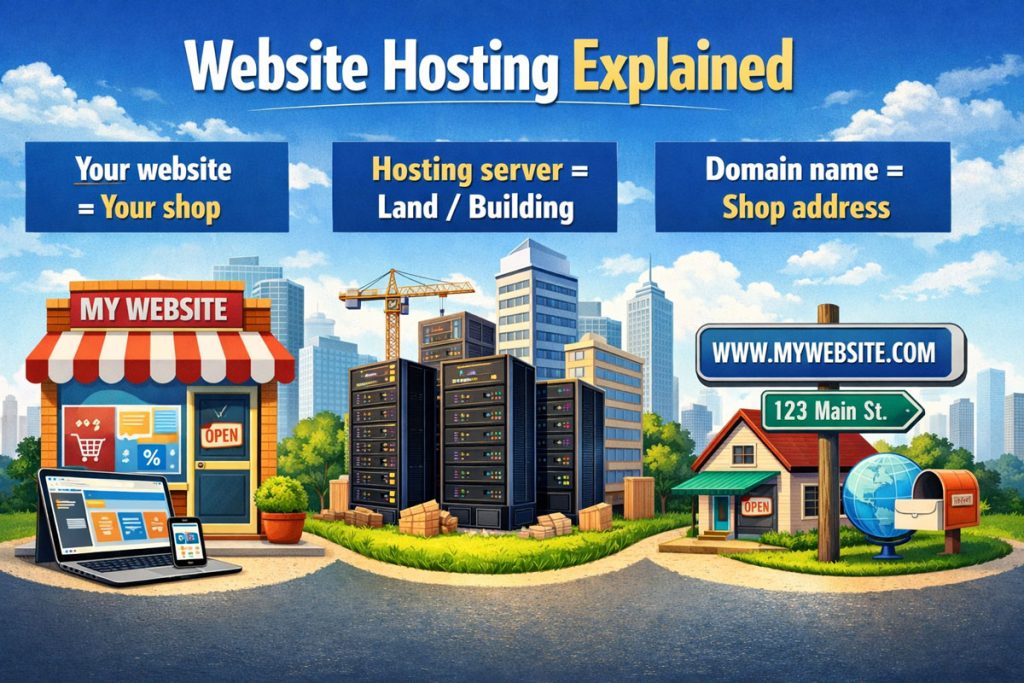
Without hosting, your website cannot exist online.
Why Choosing the Right Hosting Matters
Many beginners make the mistake of choosing the cheapest hosting without considering performance, support, or reliability.
The right hosting affects:
Reliable hosts like Hostinger, Bluehost, and SiteGround offer uptime above 99.9%, ensuring websites remain accessible most of the time.
Types of Web Hosting (Beginner Guide)
Before choosing a hosting provider, it helps to understand the different hosting types.
1. Shared Hosting
Shared hosting means multiple websites share the same server.
Pros
- Cheapest option
- Easy setup
- Perfect for beginners
Cons
- Limited resources
- Performance depends on other websites
Best for:
All three hosts in this guide offer beginner-friendly shared hosting plans.
2. VPS Hosting
VPS (Virtual Private Server) hosting gives you a dedicated portion of a server.
Pros
- Better performance
- More control
- Scalable
Cons
- Higher cost
- Requires technical knowledge
Best for:
3. Cloud Hosting
Cloud hosting uses multiple servers to host your website.
Pros
- Very reliable
- Scalable
- Handles traffic spikes
Cons
- More expensive
4. Managed WordPress Hosting
This hosting is optimized specifically for WordPress.
Features include:
Features Beginners Should Look For
When selecting the best web hosting for beginners, look for these features.
1. Easy Setup
Beginners need:
2. Free Domain Name
Many hosts include a free domain for the first year, which helps reduce startup costs.
3. Free SSL Certificate
SSL secures your website and enables HTTPS.
Google also prefers secure websites for ranking.
4. Customer Support
24/7 support is essential when you run into issues.
5. Backup System
Automatic backups protect your website data.
6. Website Builder
Many hosts offer drag-and-drop website builders for beginners.
Best Web Hosting for Beginners in 2026
After reviewing performance, pricing, support, and beginner-friendliness, these are the top hosting providers for beginners in 2026.
Hostinger – Best overall value
Bluehost – Best for WordPress beginners
SiteGround – Best performance hosting
Let’s explore each one in detail.
Hostinger Review (Best Affordable Hosting for Beginners)
Hostinger has become one of the most popular hosting providers worldwide due to its low prices and beginner-friendly tools.
It is often considered the best value hosting provider for new website owners.
Hostinger Key Features
Hostinger offers a wide range of features designed for beginners.
hPanel Control Panel
Hostinger uses its own custom control panel called hPanel, which is simpler than traditional hosting dashboards.
It allows beginners to easily manage:
- Domains
- Emails
- Websites
- Databases
One-Click WordPress Installation
Setting up WordPress takes less than a minute.
Hostinger automatically installs:
- WordPress
- Security settings
- Performance optimization
Free SSL Certificate
Every hosting plan includes free SSL.
This ensures:
- Secure browsing
- Better Google rankings
Fast LiteSpeed Servers
Hostinger uses LiteSpeed servers, which are faster than traditional Apache servers.
It also includes:
- LiteSpeed caching
- CDN integration
- SSD/NVMe storage
AI Website Builder
Hostinger includes an AI website builder that helps beginners create websites quickly.
Users simply describe their website idea, and the AI generates the design automatically.
Hostinger Pricing
Hostinger is known for extremely affordable plans.
Typical starting prices:
| Plan | Price | Websites |
| Single Hosting | ~$1.99/month | 1 website |
| Premium Hosting | ~$2.99/month | 100 websites |
| Business Hosting | ~$3.99/month | 100 websites |
Some plans include:
- Free domain
- Free email
- Free SSL
- Weekly backups
Hostinger offers some of the lowest entry prices in the hosting industry, making it ideal for beginners.
Hostinger Pros
- Extremely affordable
- Beginner-friendly dashboard
- Fast LiteSpeed servers
- Free SSL
- AI website builder
- Good performance
Hostinger Cons
- Phone support not available
- Renewal prices increase
Who Should Use Hostinger?
Hostinger is ideal for:
- Bloggers
- Affiliate marketers
- Beginners starting their first website
- Small businesses
- Students learning web development
Bluehost Review (Best Hosting for WordPress Beginners)
Bluehost is one of the most well-known hosting providers in the world.
It is officially recommended by WordPress.org and designed specifically for WordPress websites.
Bluehost Key Features
Bluehost offers powerful beginner-friendly tools.
Easy WordPress Setup
Bluehost automatically installs WordPress during signup.
The platform also includes:
- WordPress themes
- Plugin suggestions
- Setup guides
Free Domain Name
Bluehost includes a free domain name for the first year, which is very helpful for beginners starting a new website.
Custom Beginner Dashboard
Bluehost has created a dashboard that simplifies WordPress management.
Users can easily:
- Install plugins
- Change themes
- Manage security
- Configure settings
24/7 Customer Support
Bluehost provides:
- Live chat
- Phone support
- Knowledge base
- Tutorials
This makes it easier for beginners to solve problems quickly.
Website Builder
Bluehost includes a drag-and-drop website builder.
Beginners can create websites without coding.
Bluehost Pricing
Bluehost pricing typically starts around:
| Plan | Price |
| Basic | ~$2.95/month |
| Plus | ~$5.45/month |
| Choice Plus | ~$5.45/month |
Plans usually include:
- Free domain
- Free SSL
- 1-click WordPress install
- 24/7 support
Bluehost is widely considered one of the easiest hosting platforms for beginners to use.
Bluehost Pros
- Excellent for WordPress
- Free domain included
- Beginner-friendly dashboard
- Strong support
- Reliable hosting
Bluehost Cons
- Renewal prices are higher
- Performance not as fast as premium hosts
Who Should Use Bluehost?
Bluehost is perfect for:
- WordPress beginners
- Bloggers
- Personal websites
- Small businesses
SiteGround Review (Best Performance Hosting for Beginners)
SiteGround is known for premium performance and excellent customer support.
Although it costs slightly more than budget hosts, it provides top-tier reliability.
SiteGround Key Features
Google Cloud Infrastructure
SiteGround runs on Google Cloud servers, which provide excellent speed and reliability.
SuperCacher Technology
SiteGround includes a powerful caching system called SuperCacher, which improves website speed significantly.
Daily Backups
Unlike many hosting providers, SiteGround provides daily automatic backups.
This ensures you can restore your website if something goes wrong.
Managed WordPress Hosting
SiteGround offers fully managed WordPress hosting, which includes:
- Automatic updates
- Security monitoring
- Performance optimization
Staging Environment
Developers can test website changes using a staging environment before publishing.
SiteGround Pricing
Typical pricing:
| Plan | Price |
| StartUp | ~$2.99/month |
| GrowBig | ~$4.99/month |
| GoGeek | ~$7.99/month |
These plans include:
- Daily backups
- Free SSL
- CDN
- Managed WordPress features
SiteGround is more expensive but offers excellent performance and reliability.
SiteGround Pros
- Extremely reliable
- Fast performance
- Excellent support
- Daily backups
- Google Cloud infrastructure
SiteGround Cons
- Higher renewal costs
- Limited storage on basic plan
Who Should Use SiteGround?
SiteGround is best for:
- Business websites
- WooCommerce stores
- Professional blogs
- Websites expecting traffic growth
Hostinger vs Bluehost vs SiteGround (Comparison)
Here is a quick comparison of the three hosting providers.
| Feature | Hostinger | Bluehost | SiteGround |
| Starting Price | ~$1.99 | ~$2.95 | ~$2.99 |
| Free Domain | Sometimes | Yes | No |
| Beginner Friendly | Excellent | Excellent | Very good |
| Performance | Fast | Good | Excellent |
| Support | Chat | Chat + Phone | Expert support |
| Best For | Budget beginners | WordPress beginners | Performance websites |
Which Hosting is Best for Beginners?
Choosing the best web hosting for beginners depends on your needs.
Best Overall
Hostinger
Best for WordPress
Bluehost
Best Performance
SiteGround
Each provider offers excellent features, reliability, and support.
How to Choose the Best Web Hosting for Beginners
Follow these steps before choosing hosting.
Step 1: Define Your Website Type
Examples:
- Blog
- Portfolio
- Business website
- E-commerce store
Step 2: Estimate Traffic
Beginners usually start with shared hosting.
Upgrade later if traffic grows.
Step 3: Check Support
Choose hosting with 24/7 support.
Step 4: Compare Pricing
Look at:
- Initial price
- Renewal price
Step 5: Look for Beginner Tools
Choose hosting with:
- Website builders
- Setup guides
- Tutorials
Common Beginner Mistakes When Choosing Hosting
Avoid these mistakes.
Choosing the Cheapest Host
Cheap hosting often results in slow websites.
Ignoring Renewal Prices
Many hosts increase prices after the first term.
Not Checking Support
Poor support can make troubleshooting difficult.
Ignoring Performance
Speed affects SEO and user experience.
Tips for Starting Your First Website
If you are launching your first website:
- Choose shared hosting
- Install WordPress
- Use a lightweight theme
- Install essential plugins
- Optimize images
- Use caching plugins
Final Verdict
Choosing the best web hosting for beginners in 2026 depends on your budget and goals.
Best Budget Hosting
Hostinger
Best WordPress Hosting
Bluehost
Best Premium Hosting
SiteGround
All three providers offer reliable hosting, strong performance, and beginner-friendly features.
For most beginners starting a blog, affiliate site, or small business website, Hostinger or Bluehost are the best starting points.
If performance and reliability are your top priorities, SiteGround is an excellent choice.
https://shorturl.fm/172Fe
https://shorturl.fm/iTJDI
https://shorturl.fm/KnTkO
https://shorturl.fm/sfB1Z